Prompting Guide
The agent is good at engineering work and bad at guessing what you meant. Most of the difference between a session that works and one that wastes an hour is in the first message.
Say what, where, and how you will judge it
A prompt that works usually has three parts: the task, the files it concerns, and the criterion for done.
Weak:
Analyze this bracket.Better:
Static structural analysis of cad/bracket.step. Fixed at the four
M6 holes on the base flange, 1.2 kN vertical load distributed over
the top face. 6061-T6. I need peak von Mises and the margin against
yield with a factor of safety of 2.
The second version names the geometry, the boundary conditions, the material, and what number you actually want. There is nothing left to guess.
Point at files precisely
Type @ in the composer to pick a file from the workspace. It is faster than
describing a path and it cannot be misread.
For directories and patterns, be explicit: the cases under ./cases/dfbi,
every .nvm in this folder, the newest run in ./runs.
Plan first for anything substantial
Press ⇧Tab to reach Plan mode. The agent researches and proposes an approach under instructions to avoid changing files, system state, or repository state.
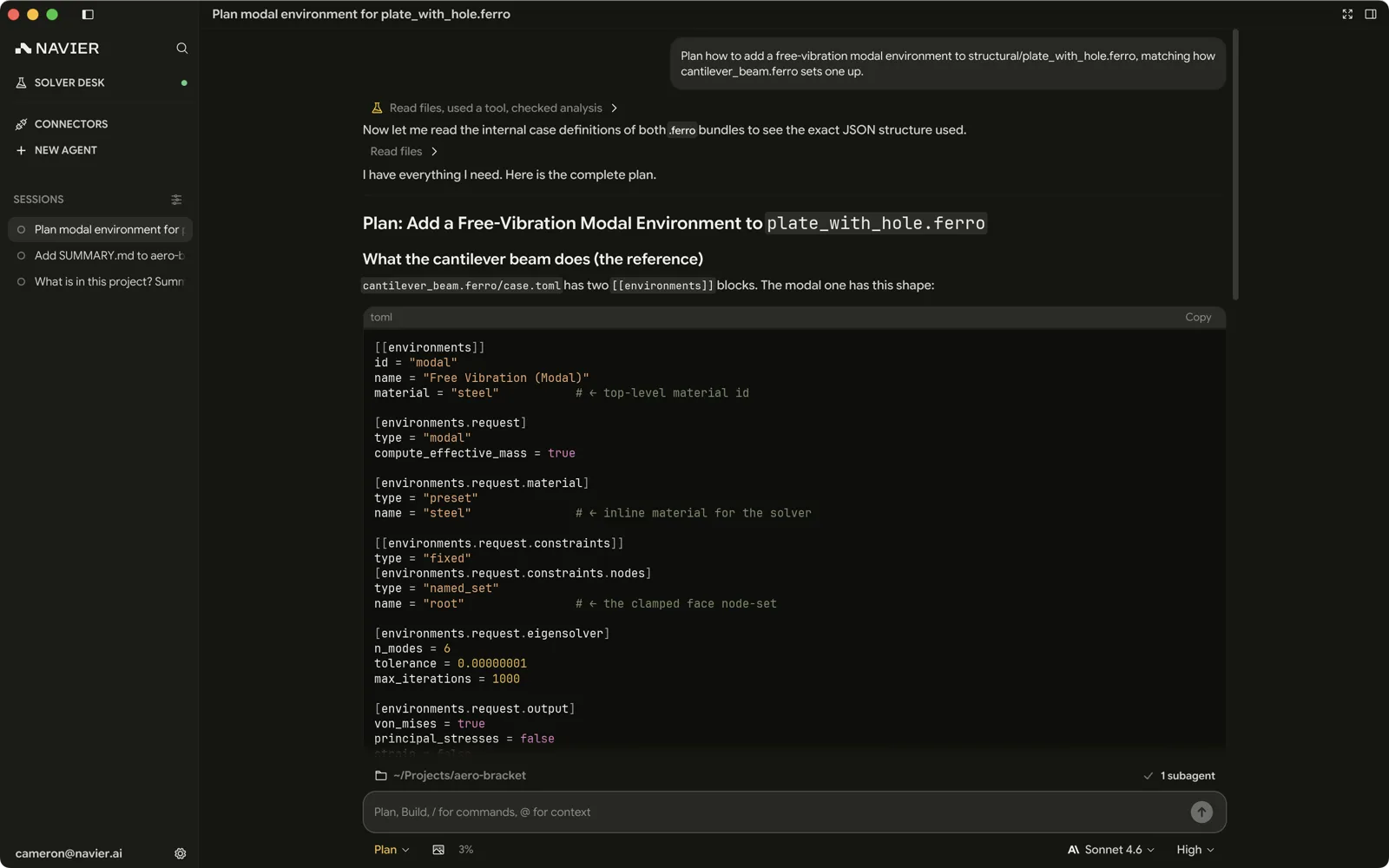
Read the plan for the things that are expensive to get wrong:
- Did it identify the right geometry and the right faces?
- Are the loads and constraints what you described?
- Is it about to run something that takes four hours?
Approving a wrong plan costs one round trip. Discovering the same error after the solve costs the solve.
Review and correct the plan, then exit Plan (for example, select Accept Edits) before asking the agent to implement it. Plan approval does not enable edits while Plan is active. Plan is not a read-only shell sandbox: shell allowlist rules and approvals still apply. See Permissions & Approvals for the shell-trust limits.
Give it the units
Units are the most common source of silently wrong answers, and no solver will catch them for you. Ferro in particular is strictly SI — Pa, N, m, K, kg, Hz — with no conversion layer. A case in millimetres solves happily and gives you nonsense.
Say the units in the prompt, and check them in the diff.
Let it read before it writes
For unfamiliar work, split the task:
Read ./cases/pipe and tell me what this case is set up to solve —
solver, turbulence model, boundary conditions, and mesh size.
Don't change anything.
Then, once you agree with its reading:
Now change the inlet to 12 m/s and rerun.Two messages, and you have verified its understanding before it acts on it.
Ask for the check, not just the result
The agent will report success readily. Ask it to prove it:
Run it, then tell me whether it converged: show the residual history
and the last 20 lines of the log.
After the solve, check the mesh quality report and tell me if
anything failed the checks.Iterate in the same thread, restart when the subject changes
Follow-ups work because the whole transcript is context. That same property makes a thread that wandered across three unrelated tasks worse at all of them.
Stay in the thread while you are refining one piece of work. Start a new one (⌘N) when you move to a different part, case, or question.
Effort
The effort picker controls how much reasoning the model spends. Raise it for:
- Setting up a case from scratch.
- Debugging a solve that failed for a non-obvious reason.
- Anything where being wrong is expensive.
Leave it low for lookups, summaries, and small edits.
Prompts worth stealing
Understanding handed-over geometry
Open cad/assembly.step and list its bodies with their bounding
boxes and face counts. Then tell me which ones look like they belong
to the same subassembly, and which sit on their own.
Setting up and running an OpenFOAM case
There's an OpenFOAM case in ./cases/duct. Check the mesh first and
tell me if it passes. If it does, run it and report convergence. If
it doesn't, tell me what failed before touching anything.
Design iteration
The bracket in cad/bracket.step fails at 1.2 kN with FoS 2. Iterate
the wall thickness and rib layout to pass at minimum mass, keeping
the hole pattern fixed. Show me the mass and peak stress each
iteration.
Visualizing a result
Build an .nvpost view of the best run in ./runs — velocity magnitude
on the surface, clipped at the symmetry plane, with the colour range
pinned to 0–40 m/s.
Producing a deliverable
Build a design-review deck for this bracket: the design intent, the
load case, a captured view of the stress field, and the margin
summary as a table. PowerPoint.
What not to do
- Do not ask for everything at once. "Design, mesh, solve, iterate, and write the report" in one message produces a long turn that is hard to review and easy to get wrong halfway through.
- Do not skip the diff. The transcript says what the agent believes it did. The diff says what it did.
- Do not assume it remembers another thread. Each thread is its own context.
- Do not trust a number you did not check. The agent is a fast, tireless engineer who occasionally states something false with complete confidence. Peak stress, mass, and convergence are all cheap to verify.