Troubleshooting
Most problems in Prism fall into four buckets: something is not signed in, something is not installed, the daemon is not where you think it is, or the workspace is not what you think it is. This page works through each.
Start here
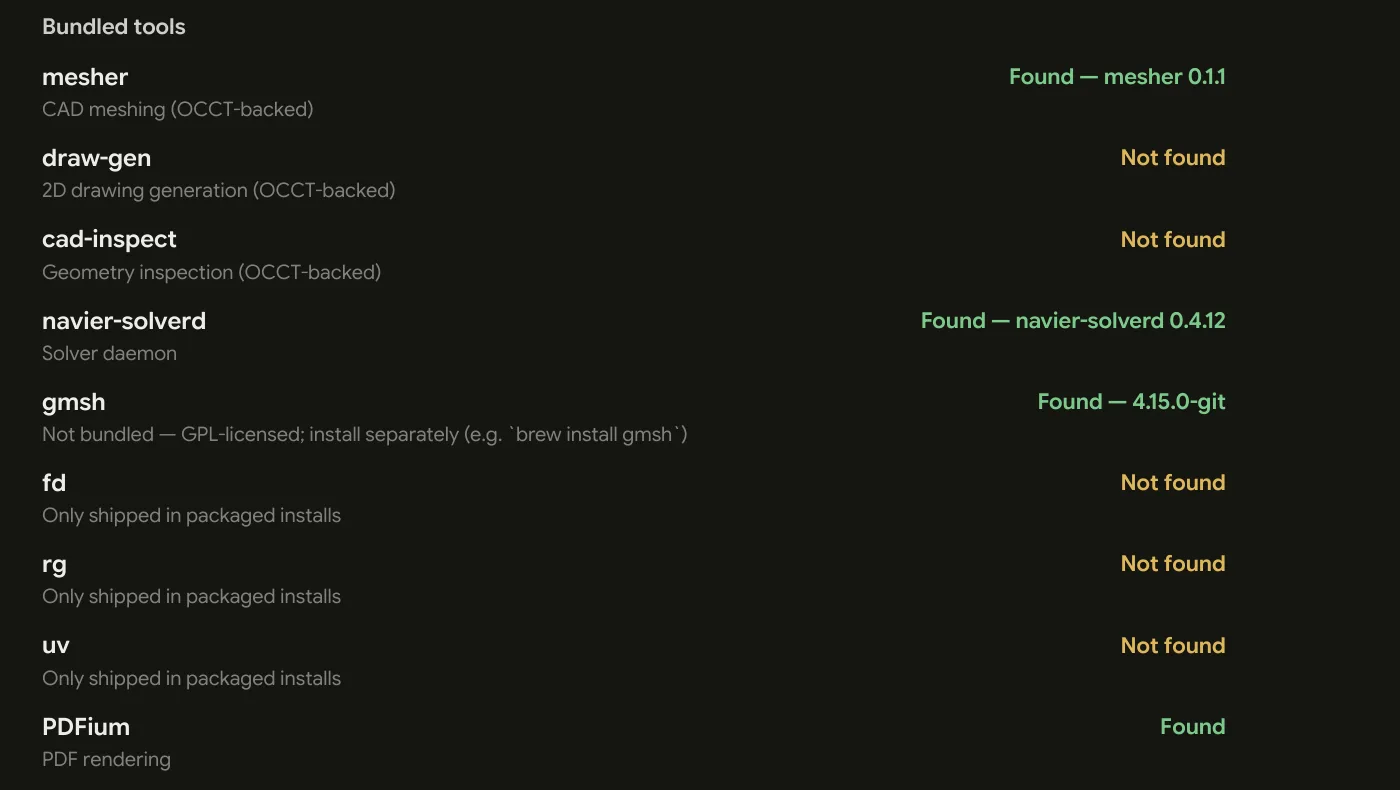
Settings → About lists every helper binary Prism resolved at startup and whether it was found. Half the "feature X is greyed out" reports are answered by one look at that page.
The agent
The agent will not respond
- Check the account. Settings → Account. Reaching the app at all means you are signed in, but the organization shown there is the one the agent and its metering run against.
- Check the connection status. Settings → Agent shows it directly.
- Check the thread is grounded. An ungrounded thread has no workspace, so file and shell tools are unavailable. See Threads & Workspaces.
"This session won't be restored next launch"
Settings → Account says this when Prism signed you in but could not write the session to the system keychain. You stay signed in for now and have to sign in again next launch. A sign-out can fail the same way, and reads signed out, but the saved session could not be removed from the keychain and will be restored next launch — the session is still in the keychain, so the next launch picks it back up.
Both are the keychain refusing access, not the agent: unlock the login keychain (macOS Keychain Access), make sure a Secret Service keyring is running on Linux, or check Credential Manager is reachable on Windows — then sign in again.
"The model provider is temporarily overloaded"
This is a temporary capacity problem, not an issue with your workspace or Prism installation. The turn ends instead of resuming automatically; wait a moment, then retry it.
"You've run out of AI credits"
The organization's AI credits are spent, so the agent service refuses the message. The error appears on the message you sent and carries a Buy credits link: top the balance up, then send it again. It reads the same whether the send was refused up front or a running turn was cut off, and the balance is in Settings → Subscription, under Usage Credits.
"New accounts are temporarily paused"
Agent usage on new free organizations is paused while Navier AI works through demand, so the agent refuses before it reaches a model. Nothing on this machine will change it — the rest of Prism works as normal, and your Navier AI contact can say where the pause stands for your organization.
It says it cannot read a file
The path is outside the workspace root. The agent's file access is scoped to the folder you attached — that is the boundary, and it is deliberate.
Either attach a root that contains the file, or start a new thread rooted somewhere broader.
It keeps asking for permission
You are in Manual mode, or the command does not match your allowlist.
⇧Tab cycles to Accept Edits, and allowlisting the read-only commands you approve constantly cuts most of the rest.
Note that a command containing &&, |, ;, >, $(, or a newline never
matches an allowlist rule, whatever its first words are. That is not a bug.
It did something I did not want
- ⌃C stops the turn.
- Open the diff and see what actually changed.
- Revert with git if the workspace is a repository.
Interrupting is not an undo — files already written stay written. If you are about to let an agent work in a permissive mode, commit first, or use a worktree.
It is slower or vaguer than it was
The thread has probably grown long and unfocused. Start a new one (⌘N). A thread carries its whole transcript, which is what makes follow-ups work and what makes a wandering thread progressively worse.
Solvers
"Docker not found"
The Solver Desk needs a container engine on the same machine — Docker Desktop, Podman, Colima, or equivalent. Nothing else in Prism needs one: Ferro is compiled in, and the viewers are all in process. Install Docker on the engine's line opens Docker's download page; Settings → Local tools installs it for you on macOS and Windows, and gives you the command on Linux. See Environment Setup.
If an engine is installed and Prism still cannot see it, read the engine's
line — it distinguishes not installed, not running, not responding, and
refusing you its socket, and Details beside it says how to fix that
particular case for whatever provides your engine. Prism checks PATH plus
the standard install locations for your platform, and looks again whenever the
engine stops answering where it last did, so an engine installed after Prism
started is picked up without a restart.
Confirm with docker run --rm hello-world.
"WSL isn't set up" (Windows)
Containers on Windows run on WSL 2, and this reads on the engine's line when WSL 2's Windows features are off — the engine cannot start, so there is nothing to start. Set up WSL beside the line opens Settings → Local tools; the Docker install there turns the features on through one administrator prompt, and a restart finishes it. See the container engine line.
The wrong engine, or the wrong socket
When the engine's line names an engine or an endpoint you did not expect, the
endpoint resolution is what to check: DOCKER_HOST wins outright when it is
set, then the Docker CLI's active context, then Podman, then the platform
default. See
which engine it talks to.
A solve dies with no useful error
Usually the container ran out of memory. Container limits are set in Docker, not in Prism, and a solver killed by the OOM reaper rarely gets to say so. Raise the memory ceiling in Docker Desktop's resource settings — see sizing.
"Mounts denied" or the case directory is empty inside the container
The daemon bind-mounts your case directory, and Docker Desktop only shares configured paths. Move the case somewhere shared — your home directory is, by default — or add its path to Docker's file-sharing list.
Results are owned by root (Linux)
They should not be: on Linux the container runs as your uid and gid. If you
are running a custom runtime from your own catalog, check that its descriptor
keeps run_as_host_user on.
The daemon is not running
Settings → Solvers and the Solver Desk both report daemon state, and the
agent's prism_solver_status tool probes it live. Start or restart it from the
Solver Desk, or ask the agent to.
Remember it is spawned detached: it survives Prism closing, and Prism adopts an already-running one on the next start rather than spawning a second.
A settings change had no effect
The core budget, idle shutdown, catalog path, and port are all read by the daemon once at startup. Change them, then restart the daemon.
A run is stuck in "Queued"
It is waiting on capacity. Either something else is running, or the core budget is lower than the run needs. Settings → Solvers → Core budget override.
A run says "Interrupted"
The daemon stopped while the run was executing. Nobody cancelled it and nothing failed — rerun it. This state exists specifically so a UI can offer "rerun" rather than a diagnosis.
A run failed
Start with the reason printed under the run in History: for a local stage it
names the application that failed and how it ended. Then read the log — prism_solver_logs, or the Logs tab of the
resulting .nvo. Solvers explain themselves there and almost nowhere else.
A run that ran out of memory and was killed is the exception: the kill comes from outside the solver, so the log is unlikely to explain it. Give the container engine more memory, or run a smaller case.
For OpenFOAM specifically, check the mesh before you debug the solver. A large share of solver failures are mesh failures wearing a solver's error message.
Installing a runtime is taking forever
It is a container image pull, and they are large. The first install of a family is the slowest thing in a first session. Subsequent runs reuse the image.
Files and viewers
A file opened as text when it should have opened in a viewer
Viewer routing is purely by extension. Check the extension is one Prism knows —
see File Types — and that it is spelled the way
Prism expects (a .STEP in capitals is fine; a .step.txt is not).
PDFs will not render
PDFium is missing. Settings → About confirms it. On Linux and in manually-assembled installs this usually means the binary was moved away from its sibling files — Prism resolves PDFium relative to its own executable.
Reinstall from the packaged artifact rather than copying the binary out.
A .pptx or .docx will not render
No conversion engine is installed. Prism renders Office files by converting them to PDF first, and that step needs LibreOffice — or, on Windows, an installed PowerPoint or Word. The file itself says which to install.
Install LibreOffice (brew install --cask libreoffice, your distribution's
package, or winget install -e --id TheDocumentFoundation.LibreOffice) and
reopen the file. If it is installed somewhere the probe misses, point
PRISM_SOFFICE at the soffice binary. A PDF of the same content previews
without any converter. Legacy .ppt and .doc are not handled at all — only
the OOXML spellings.
CAD meshing is unavailable
The mesher binary was not found. Same cause and same fix as above: keep the
install directory intact.
"the mesh and the geometry disagree by more than a factor of two"
A mesh built from a CAD script is checked against the geometry that script built, and a disagreement beyond 2x fails the step rather than handing back a model at the wrong scale. It almost always means a unit mismatch between what the STEP declares and the unit the mesher was asked for, which enters as a silent factor of 1000. Open the file and read the Size line in the viewport: if the part is already 1000x out there, the file is the problem rather than the mesh. See 3D Viewport.
gmsh is missing
Deliberately. It is GPL-licensed and not shipped. Settings → Local tools
installs it on macOS, Windows and x86_64 Linux; otherwise install it yourself
(brew install gmsh, your distribution's package, or pip install gmsh) and
Prism picks it up from PATH. The failure names what to do on your platform;
see Environment Setup.
The viewport is slow
Check the element count of what you are looking at — the mesh viewers report it. A "small" model with several million elements is not small.
The first pick against a very large mesh pauses while the acceleration structure is built; after that it is fast.
The 3D mouse does nothing
Install the 3DxWare driver. Prism talks to the driver rather than the device directly, so without it there is nothing to talk to. Then check Settings → Input → 3D mouse is on.
Installation and updates
The window shows only the Prism logo
That is the sign-in gate, and it is the whole app until you are signed in. With no button, a saved session is still being read from the keychain; give it a moment. With Log in, there is no saved session — click it, and finish the sign-in in the browser Prism opens. See Signing in.
The sign-in gate shows an error
The line under Try again is the reason the sign-in or the session restore failed, and Try again re-runs whichever step failed. Usually it is the sign-in service being unreachable — Could not reach sign-in service — so check the connection, and the loopback port if a firewall is in play (Network access covers the port). A saved session that is no longer valid is not an error: it drops you to Log in instead.
macOS says the app is from an unidentified developer
Prism is signed and notarized, so this should not happen. If it does, the download was interrupted or altered — re-download rather than right-click-opening it.
Features go missing after I move the binary
Prism resolves several sidecar tools relative to its own executable. Moving the
Prism binary out of its install directory breaks the Solver Desk, CAD
meshing, and PDF rendering. Keep the directory intact.
Prism disappeared, and the next launch asks about it
After a crash, the next launch opens Prism quit unexpectedly — a yes or no, with nothing to fill in. The report is written for you from the crash itself: the version, the time, the panic, and the last 256 KB of log, which ends at the panic record rather than at whatever the launches since appended. That log may contain file paths from your project. Send report files it; Don't send discards it. Either way the crash is offered only once, and only on the channel that crashed: a dev build's crash is never offered by the stable build.
The prompt needs you signed in, so it appears once the session is restored rather than at the window's first frame. A bug report you already have open is left alone, and the crash waits for the launch after.
The log on disk is the other record, written one file per UTC date:
| Platform | Log directory |
|---|---|
| macOS | ~/Library/Logs/com.navier.prism/ |
| Linux | ~/.local/share/com.navier.prism/logs/ |
| Windows | %LOCALAPPDATA%\com.navier.prism\logs\ |
The panic lands in that day's prism.<date>.log; a dev-channel build logs
under com.navier.prism.dev instead. An empty log is not evidence that nothing
went wrong, since a process the system kills may write nothing — and a kill is
not a panic, so it leaves no prompt on the next launch either.
The update did not appear
Builds are on either the stable or dev channel, fixed at build time. A stable build only ever offers stable updates. Switching channels means installing the other build.
The browser pane
The browser is missing on Linux
It is not available there. The shortcut and menu entry are removed rather than left pointing at a pane that cannot do anything, and the agent gets no browser tools on Linux — it will not offer to look something up in the app, so give it the page contents or a link to open in your own browser.
Getting help
Report a bug
The bug icon in the threads sidebar footer opens Report a bug; on macOS, Help ▸ Report a Bug… does the same. Describe the issue, and Prism sends your description, your Prism version, and the conversation you have open if there is one, along with your platform and release channel. A thread is not required — a report from an empty chat goes through.
- A description is required — Send stays disabled until you type one, and while an attachment is still being prepared. Empty, the dialog says Add a description to send the report.
- The description is capped at 16 KB. Over it, Send stays disabled and the dialog names the overage — there is no need to paste a log, because the logs are attached for you.
- Attach images… adds screenshots, or paste one with ⌘V / Ctrl+V. Each thumbnail has a remove control. Ten is the limit, and the dialog says so when it drops one.
- Include recent Prism logs (last 256 KB) is on by default. The logs may contain file paths from your project, so turn it off if that matters for this report.
- ⌘↩ / Ctrl+Enter sends, Esc closes.
A sent report comes back with a Reference id; quote it if you follow the report up with us.
A crash is reported from its own prompt on the next launch instead of this dialog: there is nothing to describe, no screenshots to attach, and no thread rides along, because the chat open then is not the one the crash happened in. See Prism disappeared, and the next launch asks about it.
If you are reporting somewhere else instead, include your version and release channel (Settings → About), your platform, the relevant part of the transcript or the solver log, and — for anything solver-related — what the Solver Desk says about the daemon and Docker.
The FAQ covers the questions that come up before problems do.