Machines
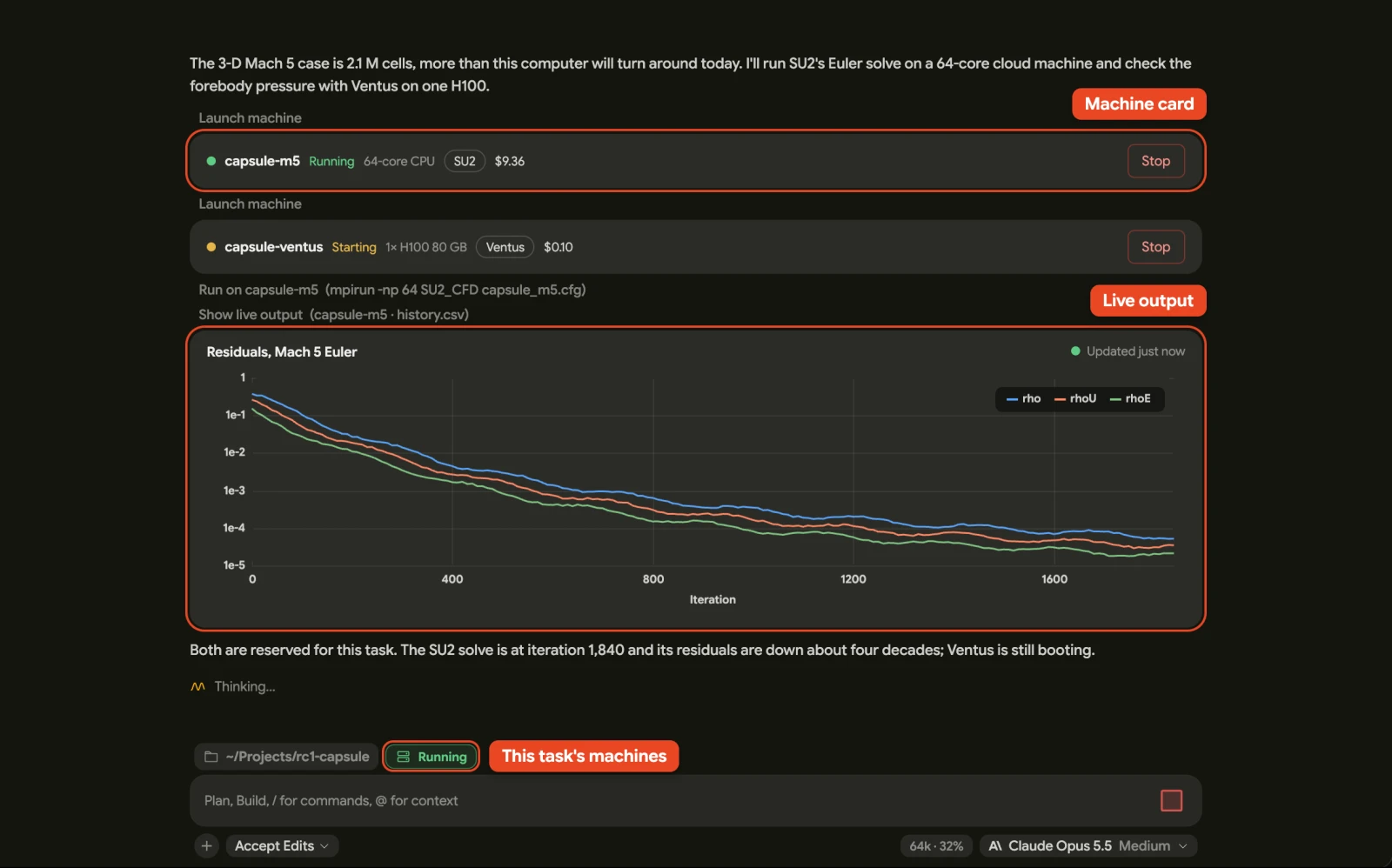
Ferro runs inside Prism. Every other solver — OpenFOAM, SU2, CalculiX, code_aster, Elmer, Yade, OpenModelica, ngspice, Basilisk, Project Chrono, openEMS, Palace, Ventus — runs on a machine: an isolated Linux environment with the solver's image, where the agent meshes, solves and post-processes. A machine is on this computer or in the cloud, and the agent works on both the same way.
Machines live on the Compute page, opened from the sidebar.
The Compute page
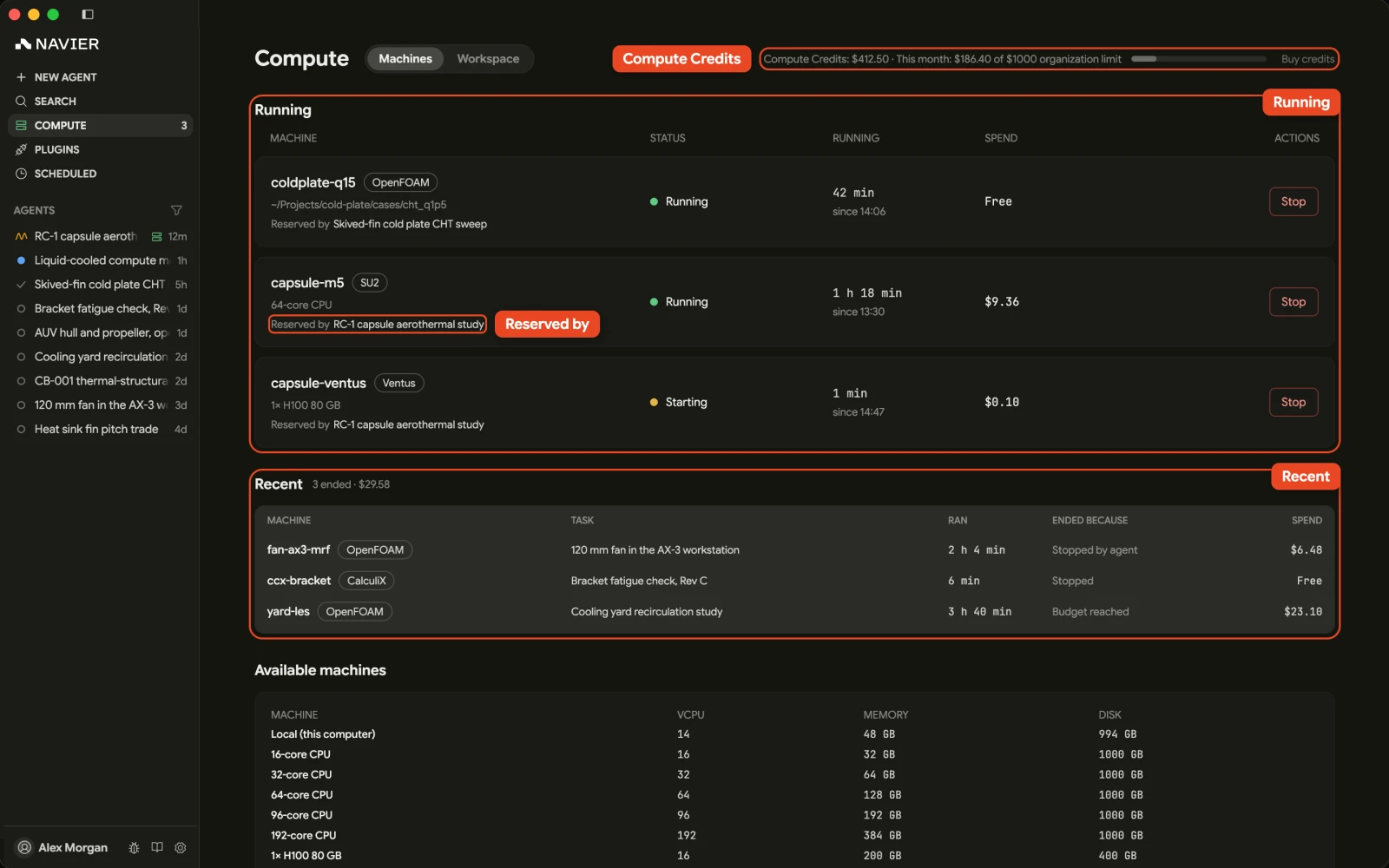
Machines is one list for both kinds:
| Section | What it shows |
|---|---|
| Running | Each machine that is up: its name, image and status, how long it has run, its spend, and Stop |
| Recent | Machines that have ended, with the task they worked for and why they ended |
| Available machines | Local (this computer) first, then the cloud machines |
| Images | What a machine can boot, what each solver is for, and where it runs |
A running machine names the chat it works for under Reserved by; click it to open that chat.
With cloud access the page also has a Workspace tab, and the header shows the organization's Compute Credits, this month's spend against its limit, and Buy credits — which opens Settings → Usage on its Compute tab, where the balance and the purchase sit together.
Available machines
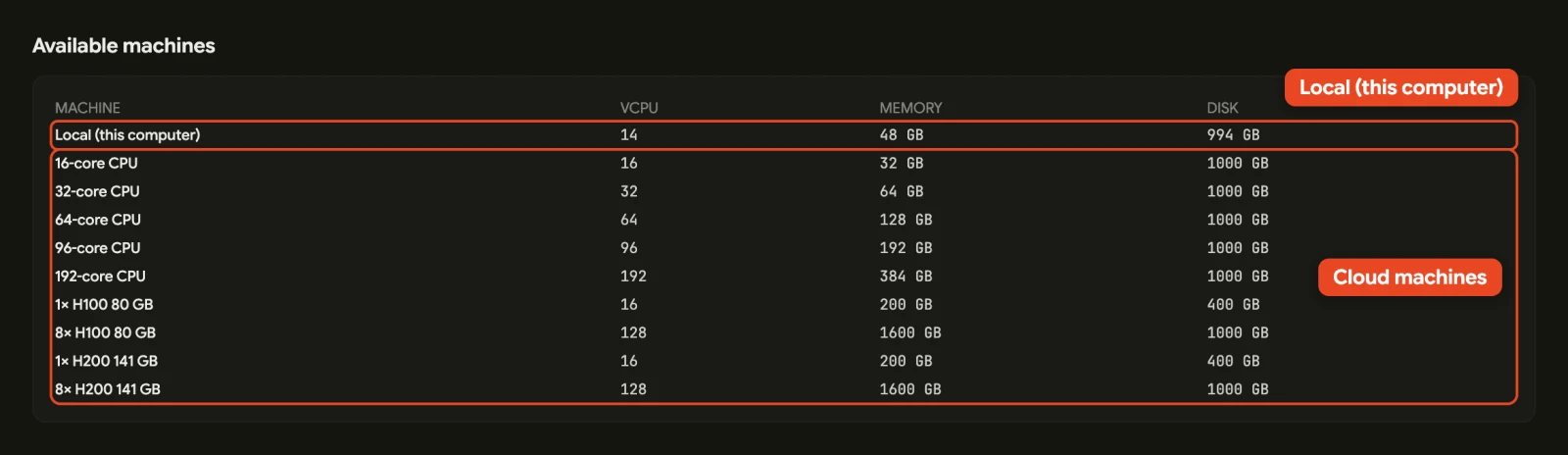
| Machine | What it is |
|---|---|
| Local (this computer) | This computer's own cores, memory and disk. Free. |
| 16- to 192-core CPU | Cloud CPU machines: 16, 32, 64, 96 or 192 vCPU |
| 1× or 8× H100 80 GB | Cloud GPU machines |
| 1× or 8× H200 141 GB | Cloud GPU machines |
The table lists each machine's vCPU, memory, disk and price. Cloud machines are listed only for organizations with cloud access.
Images
| Image | Runs here | For |
|---|---|---|
| OpenFOAM | Yes | General-purpose CPU CFD |
| OpenFOAM (single precision) | Yes | OpenFOAM with less memory, where double precision isn't needed |
| SU2 | Yes | CFD and shape optimization, especially compressible flow |
| Basilisk | Yes | Adaptive-grid fluid and multiphase flow |
| CalculiX | Yes | Linear and nonlinear structural, thermal and dynamic FEA |
| code_aster | Yes | Structural, thermal and acoustic FEA |
| Elmer | Yes | Finite element multiphysics |
| Project Chrono | Yes | Multibody dynamics, contact and granular systems |
| Yade | Yes | Discrete-element granular simulation |
| OpenModelica | Yes | Modelica system simulation |
| ngspice | Yes | SPICE circuit simulation |
| openEMS | Yes | FDTD full-wave electromagnetics |
| Palace | Yes | Finite element electromagnetics |
| Ubuntu | Yes | A clean Ubuntu 24.04; sudo on cloud machines only |
| General Engineering | Cloud only | CAD, meshing, electronics, rendering and scientific Python |
| Ventus | Cloud only | Navier's GPU CFD solver |
Every image that runs here is built from open-source software and pulled from a public registry. Ventus runs only on cloud GPU machines. On the Compute page the Images table marks each image under CPU, GPU and Local; without cloud access it lists only the images this computer runs.
A Version column gives the software each image is configured with, and a note under the table says how to read it: Versions describe the configured software; snapshots and builds are labeled. Unknown means no version was reported. So a pinned solver gives its release — 2512, 47 — while an image tracking no release says so instead: 2026-07-20 snapshot, 2026.11.17 build, or Unpinned packages.
Machines on this computer
A machine on this computer is a container. It is free, and it uses this computer's cores, memory and disk.
It needs a container engine: Docker or Podman. Set one up from Settings → Local tools, or ask the agent to. See Environment Setup.
The agent launches one in the case's folder when a case needs a solver. The folder is the only part of this computer the machine can see, and files the solver writes there appear in your project as they are written.
The first launch of an image downloads it, several gigabytes for most solvers. Later launches start in seconds.
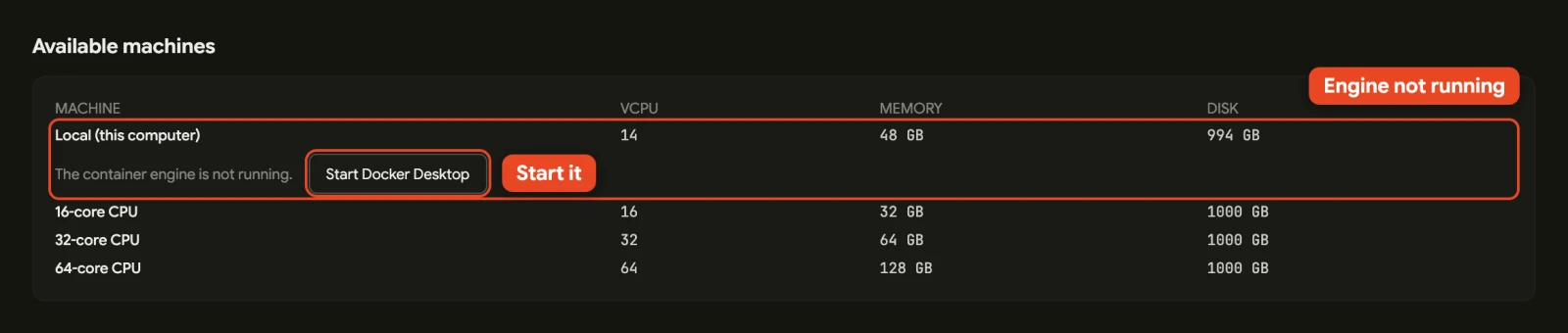
Engine health. When the container engine is missing or stopped, the Local (this computer) row says so. A stopped engine gets a button that starts it, and the agent offers the same in the chat.
Stopping. Stop on the machine's card, or ask the agent. Whatever is running ends; the folder keeps everything. A later machine in the same folder picks up where this one left off. A stopped machine stays under Recent for a week, then Prism removes it.
Disk. Prism keeps downloaded images so the next launch is fast. To reclaim
the space, remove Prism's images by name — Docker Desktop's Images view, or
docker image ls then docker image rm <image> (Podman: podman image rm).
Avoid image prune -a: it also removes other projects' images. The next launch
downloads the image again.
Cloud machines
Run on a cloud machine for more cores or memory than this computer has, for a GPU, or for Ventus.
What your plan allows. Where cloud machines are offered at all, the plan sets what an organization may run. These are the limits a plan starts with; an organization's own can be set differently.
| Plan | Cores per machine | Cloud tasks at once | GPU machines |
|---|---|---|---|
| Free plan | 16 | 1 | No |
| Prism (paid) | No limit | No limit | Yes |
Memory-optimized machines are on neither plan. An organization on the Free plan starts with $5 of Compute Credits, once, and cannot buy more; on the paid plan it can. Under Available machines, a machine the plan cannot run is faded, and hovering it gives the reason — that the plan caps a run at so many cores, or that GPU or memory-optimized machines are not included in it. Running more cloud tasks at once than the plan allows is refused at launch instead.
Where the page reads Cloud machines are not available: followed by a reason — among them a subscription that is not active, a usage limit already reached, no seat in this organization, or an unfinished account setup — that is the answer from your account rather than a fault here. Retry asks again; Prism does not keep asking on its own.
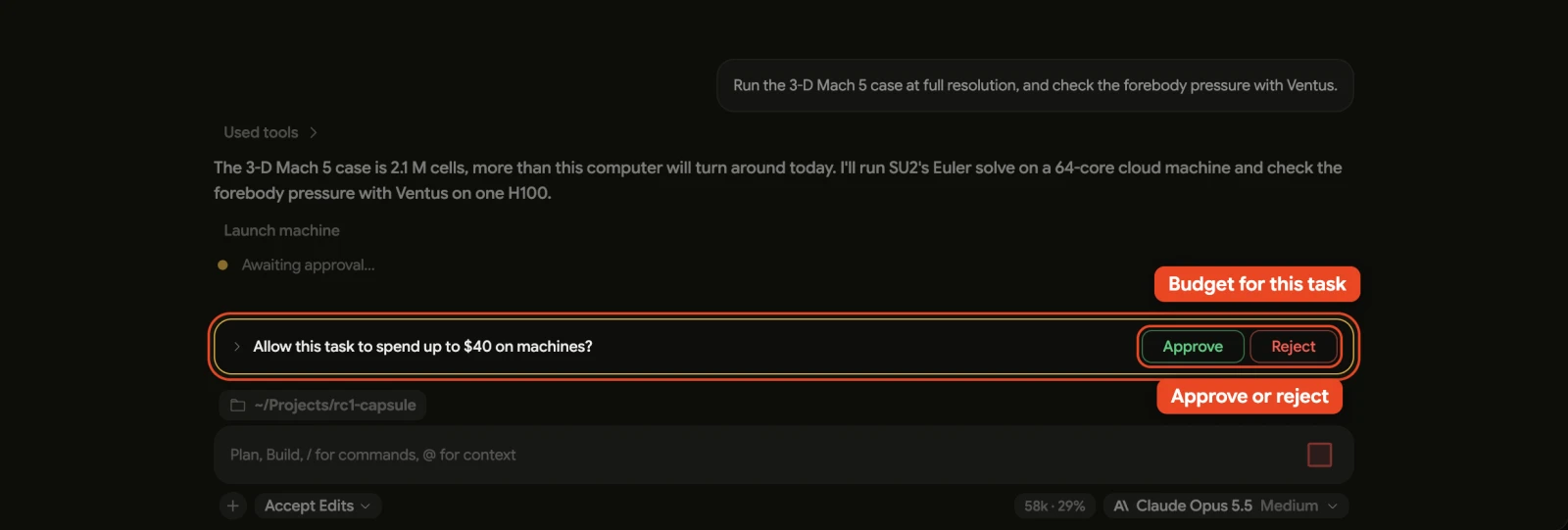
Budgets. Before a task's first cloud machine, the agent asks you to approve a budget for that task: the most it may spend on machines. Every machine the task launches draws on it. Raising it asks you again. Machine time is paid from the organization's Compute Credits, within its monthly spend limit.
Stopping. A cloud machine runs until you or the agent stops it, its task's budget runs low, or it reaches its time limit. Prism holds back half an hour of each running machine's rate so it can stop cleanly, so a budget needs to cover the run plus that half hour. Stop on its card ends it at once. Recent says why each one ended — stopped by you, by the agent, budget reached, time limit reached — and what it spent.
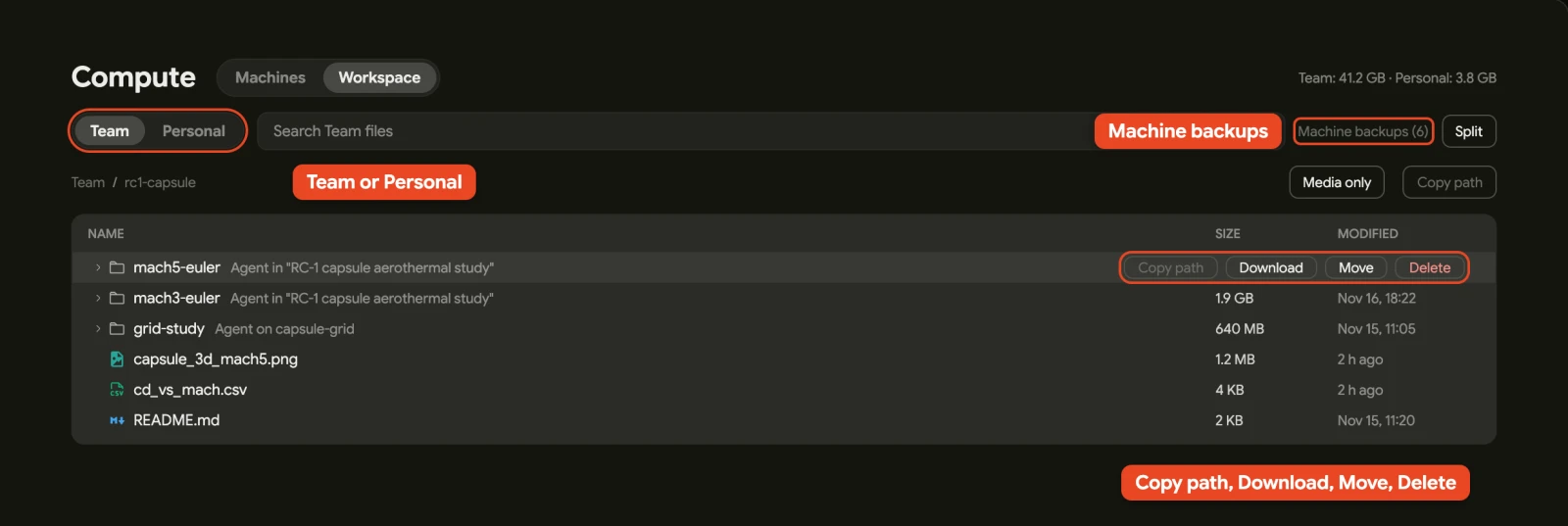
Files. The agent sends a case's files to the machine when it launches. While it runs, the machine backs up its work folder every 15 minutes and once more as it stops. Backups are under Workspace → Machine backups, with Download and Delete. A backup is a recovery copy, deleted after 30 days: save what you want to keep to a folder in your workspace.
Live output. The agent can pin a file the run keeps writing — residuals, forces, a log — to the chat. A CSV is plotted, a text file is tailed, and the card refreshes while the machine runs. A card that has had no new data for a while says so; the run may have stalled.
Workspace
The Workspace tab is your organization's cloud storage, for results worth keeping after a machine is gone. Personal holds your own folders, Team the organization's.
The agent saves files from a machine into a folder it chooses, and can read them back on a later machine. Browse, preview, search, Download, Move and Delete here. Copy path gives a reference to a file or folder; paste it into a chat to point the agent at it, and click one in a chat to open it here.
Upload, on the breadcrumb row, sends files from this computer into the folder you have open. It takes files, not folders, and a file already there under the same name is replaced.
The agent can upload for you too, from the project it is working in. The file
it reads is gated exactly as writing that file would be — a card in Manual,
none in Accept Edits or Bypass, refused in Plan — so the
table in Permissions
decides what it can send: a path outside the project root is refused in every
mode, .git, .navier and .prism are refused if named directly, and a
credential store under the root asks even in Accept Edits. Uploading a
directory sends its contents, leaving out those three and the credential
stores at any depth, and the result names some of what it left behind. More
than a gigabyte at once is refused until you have been asked.
How the agent uses a machine
Ask for the result, not the steps:
Check the mesh in ./cases/duct, and if it passes, run simpleFoam on 8 cores.
Tell me when it converges or explain why it didn't.
The agent picks the machine and image, launches it — asking first — and runs each step as its own command: for a parallel OpenFOAM case, the mesh, the mesh check, the decomposition, the solve, the reconstruction. It writes and edits files on the machine, reads the logs, looks at images the run produces, and stops the machine when the work is done.
A long command runs in the background and reports back to the chat when it finishes, so the agent can keep working or end its turn meanwhile. Once a machine is up, the agent works on it through the machine's own tools, the same on this computer and in the cloud.
Sending your files to a machine needs Prism 0.6.5 or newer. An older Prism cannot do it at all, so the agent will tell you to update Prism and work from saved workspace data and the files it writes on the machine until you do.
Reading results
Each command writes its output to log.<application> in the case folder —
log.blockMesh, log.simpleFoam — next to the results. Open them like any
other file.
A case folder that holds a run.navier file opens as Run Output:
convergence charts and a tab for each log. The agent writes it when it sets a
case up.
Troubleshooting
- There is no container engine. Install Docker or Podman from Settings → Local tools.
- The container engine is not running. Start it from the Local (this computer) row, or from the card the agent shows in the chat.
- A run was killed for memory. Give the container engine more memory in its own settings, use a smaller case, or run it on a cloud machine.
- The first launch is slow. The image is downloading, once.
- The disk is filling up. Remove unused images with the engine; see Disk.